Within Subjects ANOVA

Lecture 14

Dave Brocker

Farmingdale State College

When to Use Repeated Measures ANOVA

Use Repeated Measures ANOVA when:

  • You have the same participants measured more than once (e.g., pre-test/post-test).

  • You’re interested in changes over time or under different conditions.

    • Testing whether students’ enjoyment of statistics improves after receiving lollipops for 2 weeks.

Between vs. Within Subjects ANOVA

  • Between-Subjects ANOVA:

    • Compares means between groups (e.g., Group A vs. Group B vs. Group C).

    • Error comes from individual differences between people.

  • Within-Subjects (Repeated Measures) ANOVA:

    • Compares means within the same participants over time.

    • Controls for individual differences.

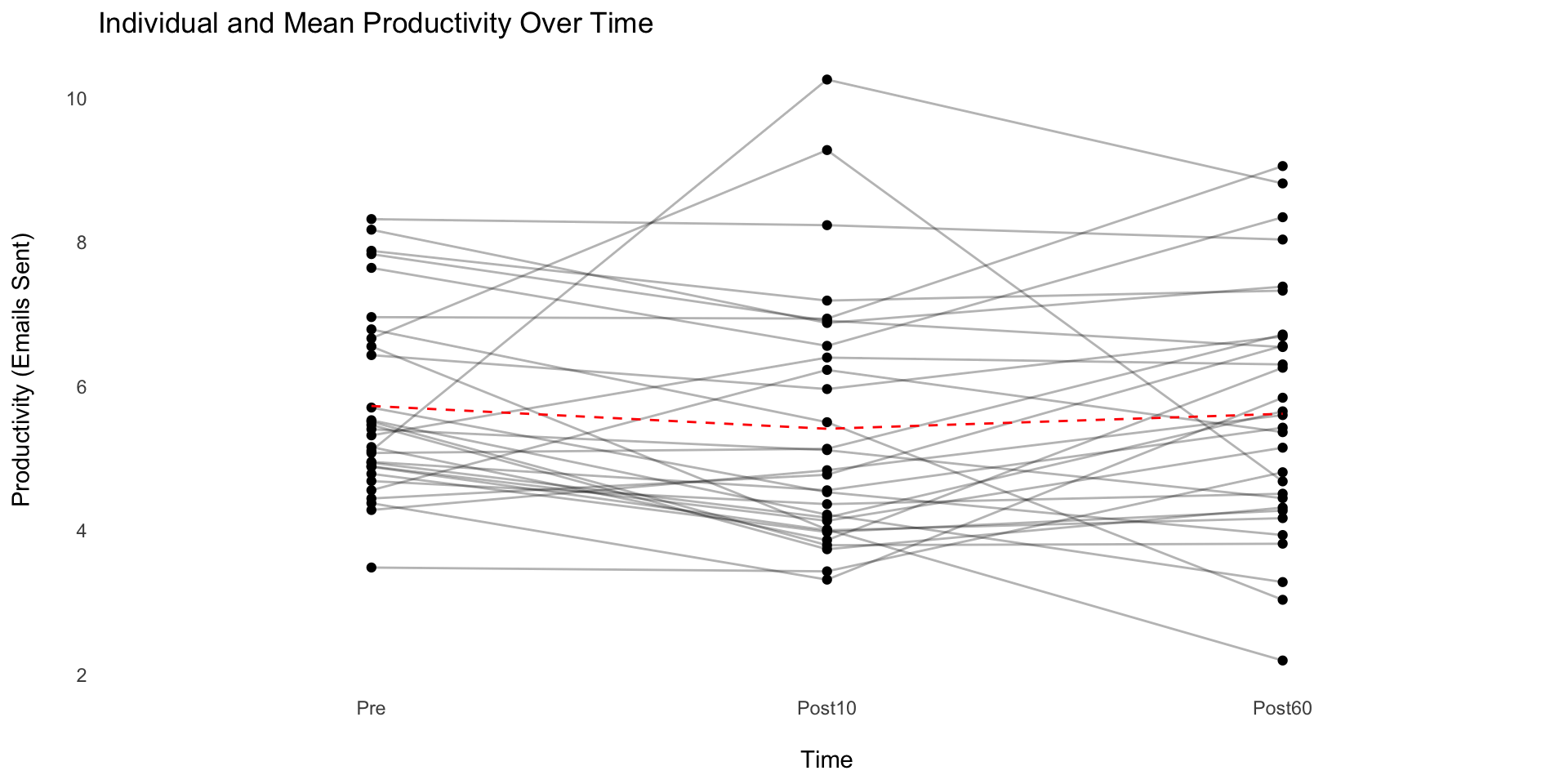
Pizza and Productivity Study

A Repeated-Measures Design

  • Objective: Test whether productivity changes over time
  • IV:
    1. Before lunch
    2. 10 minutes after pizza
    3. 1 hour after pizza
  • Same participants measured at each timepoint
  • DV:
    • Number of emails written in 10 minutes

Visualizing the Data

Code
library(tidyverse)
library(forcats)

set.seed(123)
data <- tibble(
  id = rep(1:30, each = 3),
  time = factor(rep(c("Pre", "Post10", "Post60"), times = 30), ordered = TRUE),
  productivity = c(
    rnorm(30, mean = 5, sd = 1),
    rnorm(30, mean = 7, sd = 1.5),
    rnorm(30, mean = 4.5, sd = 1)
  )
)

data %>%
  ggplot(aes(fct_inorder(time), productivity, group = id)) +
  geom_point() +
  geom_line(alpha = 0.3) +
  stat_summary(
    aes(group = 1), 
    fun.data = "mean_se", 
    geom = "line", 
    color = "red", 
    lty = "dashed"
    ) +
  labs(
    title = "Individual and Mean Productivity Over Time",
    x = "\nTime",
    y = "Productivity (Emails Sent)\n"
    ) +
  theme_minimal() +
  theme_sub_panel(grid = element_blank())

Why Repeated-Measures ANOVA?

  • Can’t use multiple paired-samples t-tests
    • Alpha inflation - increases Type I error
  • Repeated-Measures ANOVA allows us to:
    • Compare within-subject changes across time
    • Control for individual variability
    • Test for an overall time effect

Repeated-Measures ANOVA

Assumptions

  • Normality of differences
  • Sphericity: Equal variances of pairwise differences
    • Test: Mauchly’s Test
  • If assumption is violated, use Greenhouse-Geisser correction
    • Always check sphericity if more than two levels of the within-subject factor

Repeated-Measures ANOVA

Interpretation

  • F(2, 58) = 12.3, p < .001
    • Main effect of time on productivity
    • Productivity changes significantly across timepoints
      • What would be your next step?

Follow-Up

Post-hoc Comparisons

  • Run paired t-tests with Bonferroni correction
  • Which timepoints differ?
    • Pre vs. Post-10 Minutes
    • Post-10 Minutes vs. Post-60 Minutes
    • Pre vs. Post-60 Minutes

ANOVA

  • Between subjects ANOVA compares means between groups to determine if they differ significantly from one another.

  • Within subjects ANOVA compares pre-manipulation means to post-manipulation means to determine if there is a difference within participants over time.

Within Subjects ANOVA

  • Within subjects ANOVA examines differences within participants over time.

  • Within subjects ANOVA is also known as Repeated Measures ANOVA, because it looks at one measure repeated over time.

Within Subjects ANOVA

The independent variable is time.

  • Before intervention: baseline or pre-test

  • After intervention: post-test

Within Subjects ANOVA

  • Within subjects ANOVA can look at 2 or more time points.
    • Think about this as conditions

Within Subjects ANOVA

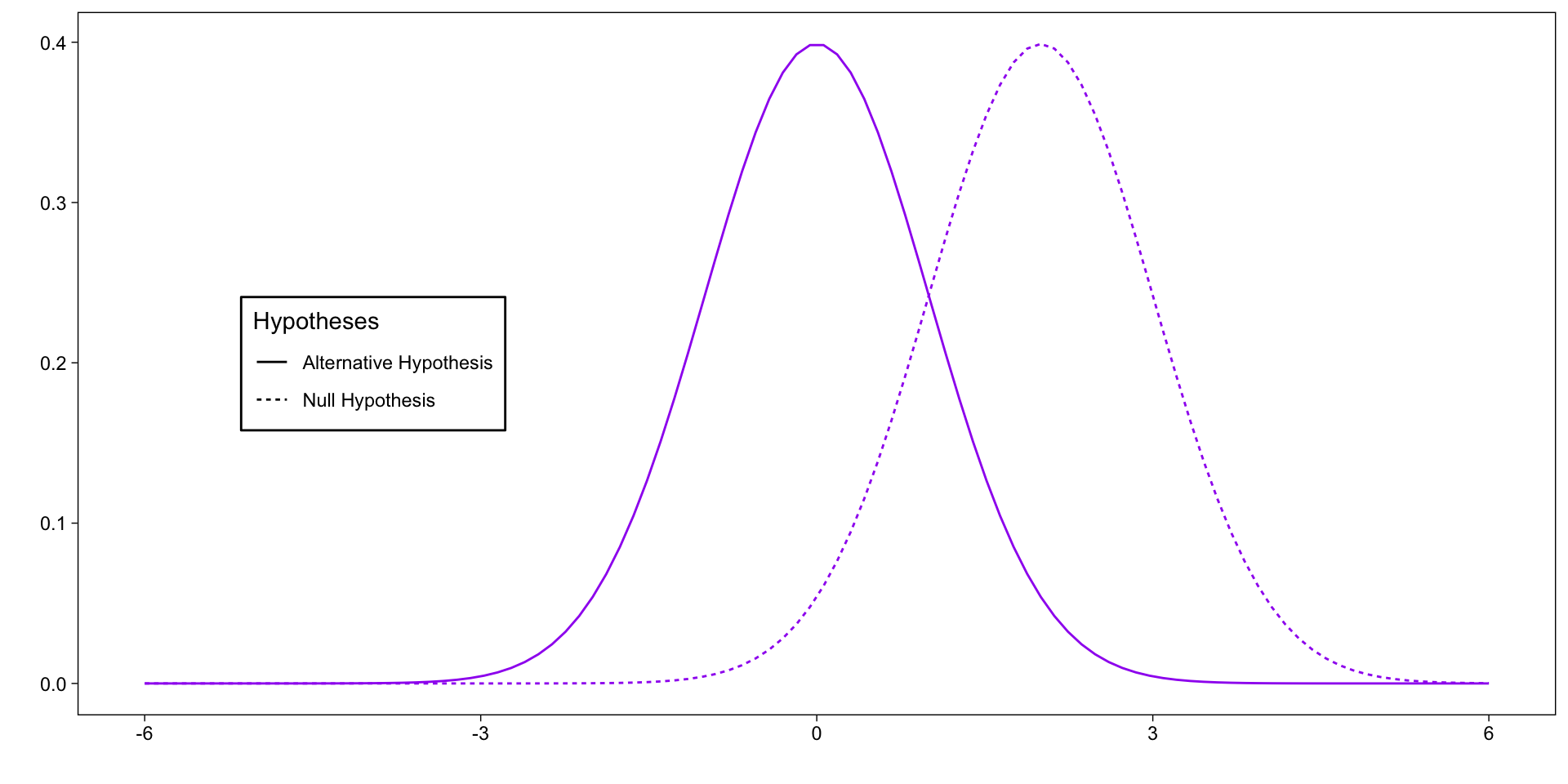
Code
library(ggplot2)
library(dplyr)
library(gt)
library(gtsummary)
library(broom)
library(afex)

# Generate data for two normal distributions
x <- seq(-6, 6, length=100)
null_dist <- dnorm(x, mean = 0, sd = 1)
alt_dist <- dnorm(x, mean = 2, sd = 1)

data <- data.frame(
  x = rep(x, 2),
  y = c(null_dist, alt_dist),
  hypothesis = factor(rep(c("Null Hypothesis", "Alternative Hypothesis"), each=length(x)))
)

# Create the plot

plt <- 
  ggplot(data, aes(x = x, y = y, 
                 lty = rev(hypothesis))) +
    geom_line(aes(color = "purple")) +
  theme_linedraw() + 
  labs(
    x = "",
    y = "",
    lty = "Hypotheses"
  ) + 
  theme(
    panel.grid = element_blank(),
    legend.position = "inside",
    legend.position.inside = c(.2,.5),
    legend.background = element_rect(color = "black")
  ) + 
  scale_color_identity()

plt

Between Subjects ANOVA

In between subjects ANOVA, we analyze two types of variance:

  • Between Group variance: How the data varies between the groups

  • Error variance: How the data varies across all participants

Within Subjects ANOVA

In within subjects ANOVA the variance is more complicated, because data will differ in 3 ways:

  • Over time

    • How the data varies across time-points
  • Error variance:

    • How the data varies across all participants
  • Per participant

    • How the data varies between each person

Within Subjects ANOVA

Over Time

A person’s mood measured before TV, during TV, and after TV are correlated because they come from the same person

Within Subjects ANOVA

Error

Mood will have natural variance across participants and time.

Within Subjects ANOVA Example

Per participant

Each participant’s scores will be more like their other scores than they are like the scores of another participant.

Within Subjects ANOVA

Code
digraph {     
    node[shape = "box", style = "rounded"]
    
      A[label="Total Variability"]
      B[label="Time Variability"]
      C[label="Within-Groups Variability"]
      D[label="Subject Variability"]
      E[label="Error Variability"]
      
      A -> B
      A -> C
      C -> D
      C -> E
}

A Total Variability B Time Variability A->B C Within-Groups Variability A->C D Subject Variability C->D E Error Variability C->E

Within Subjects ANOVA

What is the F ratio in between subjects ANOVA?

  • \(F = \frac{{MS_{BG}}}{MS_{Error}}\)

  • \(MS_{BG} = \frac{SS_{BG}}{df_{BG}}\)

  • \(MS_{Error} = \frac{SS_{Error}}{df_{Error}}\)

Within Subjects ANOVA

We want measure 2 sources of variance:

  • \(SS_{Time}\)

    • Similar to SSBetween from between subjects ANOVA
  • \(SS_{Error}\)

    • Harder to calculate in within subjects ANOVA, because of the subject variance.

Within Subjects ANOVA

  • \(SS_{WG} = SS_{Subjects} + SS_{Error}\)

Within Subjects ANOVA

  • \(SS_{W} = SS_{Subjects} + \color{red}{SS_{Error}}\)

  • \(SS_{Error} = SS_{W} - SS_{Subjects}\)

Calculating Means Squared (MS)

  • We calculate a SS for the variance between the times points (\(SS_{Time}\)).

    • This is just like the \(SS_{BG}\) from between subjects ANOVA
  • We calculate a SS for the within group variance (\(SS_{W}\)).

  • We calculate a SS for the variance by person (\(SS_{Subject}\)).

  • To find \(SS_{Error}\), we subtract \(SS_{Subjects}\) from \(SS_{WG}\).

Calculating means squared (MS)

  • \(MS_{Time} = \frac{SS_{Time}} {df_{Time}}\)

  • \(MS_{Error} = \frac{(SS_{W} - SS_{Subject})}{df_{Error}}\)

Degrees of freedom

  • Time \((MS_{Time}) = k - 1\)

  • Error \((MS_{Error}) = (n - 1) \times (k - 1)\)

    • k is the number of time points

Degrees of Freedom

Examples

A researcher measures students’ stress levels at three time points during finals week:

a) Three days before the exam b) The night before the exam c) After the exam. A total of 20 students provided stress ratings at all three times.

What are the df’s for a one-way repeated-measures ANOVA on Time?

Degrees of Freedom

Examples

A researcher measures students’ stress levels at three time points during finals week:

a) Three days before the exam b) The night before the exam c) After the exam. A total of 20 students provided stress ratings at all three times.

  1. dfTime = 3 - 1 = 2
  2. dfError = 19*2 = 38
  3. dfSubjects = 20-1 = 19

Calculating Repeated-Measures ANVOA

  • \(F = \frac{MS_{Time}}{MS_{Error}}\)

  • \(MS_{Time} = \frac{SS_{Time}}{df_{Time}} = \frac{SS_{Time}}{(k - 1)}\)

  • \(MS_{Error} = \frac{(SS_{W} - SS_{Subject})} {df_{Error}} = \frac{(SS_{W}\ - SS_{Subject})}{(n-1)\times(k-1)}\)

Repeated-Measures ANOVA

Example

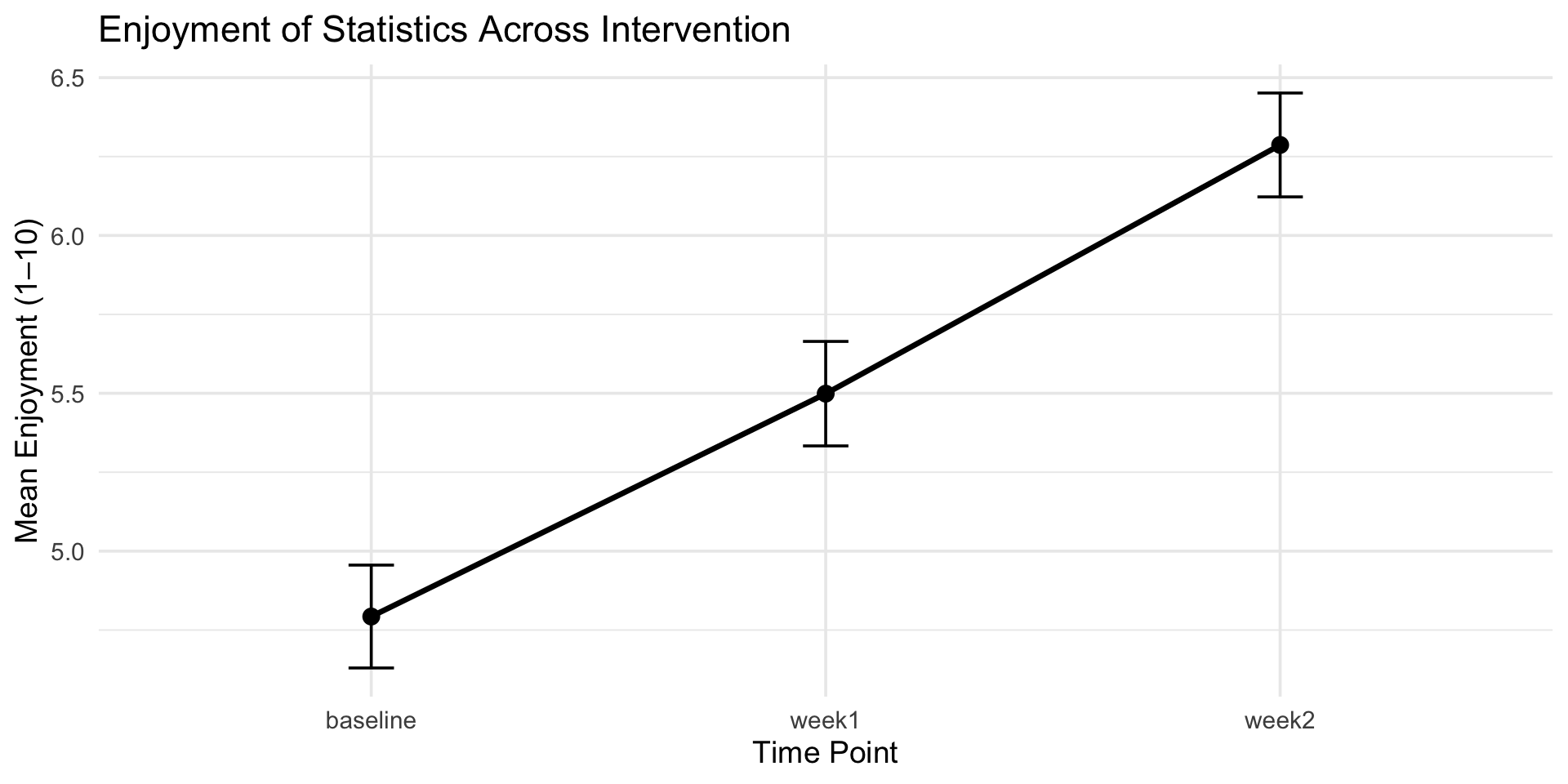
Prof. Brocker wants to evaluate whether a new engagement intervention improves students’ attitudes toward statistics. At the beginning of the semester, 100 students complete a survey rating how much they enjoy statistics on a scale from 1 (not at all) to 10 (extremely).He then implements a two-week intervention in which each class begins with a brief statistics-related warm-up activity designed to increase interest and reduce anxiety. After the first week of the intervention, students rate their enjoyment of statistics again. At the end of the second week, they complete the rating a third time.

  • dfTime =

  • dfSubjects =

  • dfError =

  • n =

Practice

Prof. Brocker wants to evaluate whether a new engagement intervention improves students’ attitudes toward statistics. At the beginning of the semester, 100 students complete a survey rating how much they enjoy statistics on a scale from 1 (not at all) to 10 (extremely).He then implements a two-week intervention in which each class begins with a brief statistics-related warm-up activity designed to increase interest and reduce anxiety. After the first week of the intervention, students rate their enjoyment of statistics again. At the end of the second week, they complete the rating a third time.

  • dfTime = 3 - 1 = 2

  • dfSubjects = 100-1 = 99

  • dfError = (100 - 1) * (3-1) = 198

  • n = 100

Practice

Prof. Brocker wants to evaluate whether a new engagement intervention improves students’ attitudes toward statistics.

Code
library(tidyverse)
library(ez)
library(afex)

set.seed(2025)  # for reproducibility

n <- 100

# Baseline: lower enjoyment, more variability
baseline <- rnorm(n, mean = 4.8, sd = 1.6)

# After Week 1: slight increase
week1 <- baseline + rnorm(n, mean = 0.7, sd = 0.5)

# After Week 2: additional increase
week2 <- week1 + rnorm(n, mean = 0.8, sd = 0.5)

# Keep scores bounded between 1 and 10
clip <- function(x) pmin(pmax(x, 1), 10)
baseline <- clip(baseline)
week1    <- clip(week1)
week2    <- clip(week2)

# Construct long dataset
data_long <- tibble(
  id = factor(1:n),
  baseline = baseline,
  week1 = week1,
  week2 = week2
) %>%
  pivot_longer(cols = baseline:week2,
               names_to = "time",
               values_to = "enjoyment")

aov_ez(
  data = data_long,
  dv = "enjoyment",
  id = "id",
  within = "time",
  anova_table = list(es = "ges"),
  return = "aov"
) |>
  tidy() |> 
  rename(
    Source = term,
    SS = sumsq,
    MS = meansq,
    `F` = statistic, 
    p = p.value
  ) |> 
  select(-stratum) |> 
  filter(Source == "time" | df == 198) |> 
  gt() |> 
  fmt_auto()
Source df SS MS F p
time   2  111.716 55.858 343.599 4.101 × 10−65
Residuals 198   32.188  0.163 NA NA
Code
data_long %>%
  group_by(time) %>%
  summarize(mean = mean(enjoyment), se = sd(enjoyment)/sqrt(n)) %>%
  ggplot(aes(x = time, y = mean, group = 1)) +
  geom_line(size = 1.2) +
  geom_point(size = 3) +
  geom_errorbar(aes(ymin = mean - se, ymax = mean + se), width = 0.1) +
  labs(title = "Enjoyment of Statistics Across Intervention",
       x = "Time Point",
       y = "Mean Enjoyment (1–10)") +
  theme_minimal(base_size = 14)

ANOVA

Professor Brocker is interested in whether structured active-learning practices improve 80students’ attitudes toward statistics over time. He administers a 1–10 enjoyment rating at three points:

  1. Beginning of the semester (before any intervention).

  2. After four active-learning modules (mid-semester).

  3. After eight active-learning modules (end of the semester).

  1. dfTime =
  2. dfParticipants =
  3. dfError =

Practice

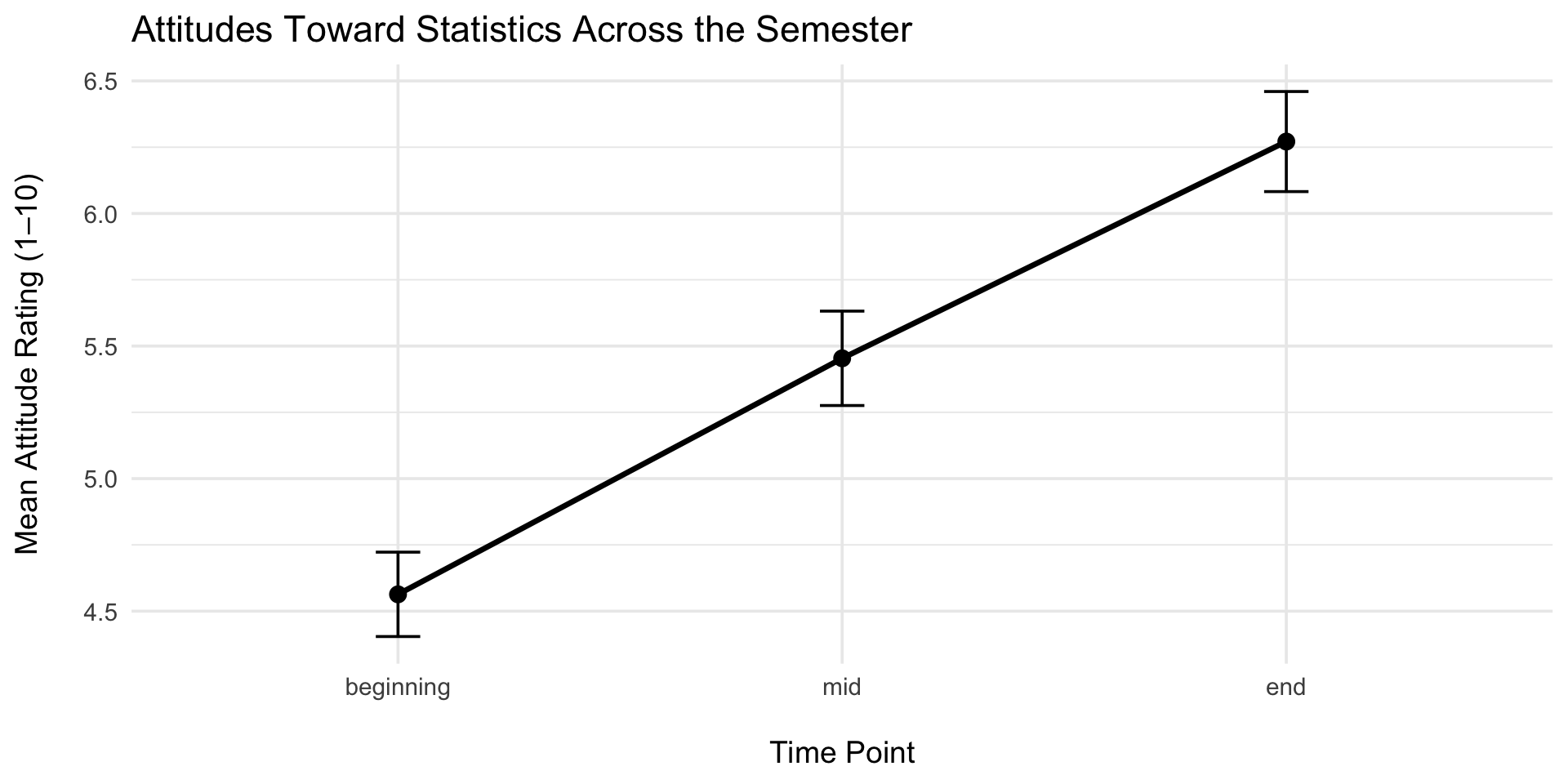
Professor Brocker is interested in whether structured active-learning practices improve 80 students’ attitudes toward statistics over time. He administers a 1–10 enjoyment rating at three points:

  1. Beginning of the semester (before any intervention).

  2. After four active-learning modules (mid-semester).

  3. After eight active-learning modules (end of the semester).

  1. dfTime = 3 - 1 = 2
  2. dfParticipants = 80 - 1 = 79
  3. dfError = 158

Practice

Professor Brocker is interested in whether structured active-learning practices improve 80 students’ attitudes toward statistics over time. He administers a 1–10 enjoyment rating at three points:

Code
set.seed(2025)

n <- 80

# Attitude ratings (1–10 scale)
beginning <- rnorm(n, mean = 4.5, sd = 1.4)   # before any modules
mid       <- beginning + rnorm(n, mean = 1.0, sd = 0.6)  # after 4 modules
end       <- mid + rnorm(n, mean = 0.8, sd = 0.5)        # after 8 modules

# Bound values between 1 and 10
clip <- function(x) pmin(pmax(x, 1), 10)

beginning <- clip(beginning)
mid       <- clip(mid)
end       <- clip(end)

# Create long dataset
data_long2 <- tibble(
  id = factor(1:n),
  beginning = beginning,
  mid = mid,
  end = end
) |>
  pivot_longer(
    cols = beginning:end,
    names_to = "time",
    values_to = "attitude"
  ) |> 
  mutate(
    time = factor(time, 
                  levels = c("beginning","mid","end"))
    )

# ------------------------------
# Repeated-Measures ANOVA
# ------------------------------

rm_aov <- aov_ez(
  id = "id",
  dv = "attitude",
  within = "time",
  data = data_long2,
  anova_table = list(es = "ges"),
  return = "aov"
)

# Clean table for display
rm_aov |>
  tidy() |>
  rename(
    Source = term,
    SS = sumsq,
    MS = meansq,
    `F` = statistic, 
    p = p.value
  ) |> 
  select(!stratum) |>
  gt()
Source df SS MS F p
Residuals 79 552.89748 6.998702 NA NA
time 2 116.75497 58.377487 281.961 7.467537e-53
Residuals 158 32.71248 0.207041 NA NA
Code
data_long2 |>
  group_by(time) |>
  summarize(
    mean = mean(attitude),
    se = sd(attitude) / sqrt(n)
  ) |>
  ggplot(aes(fct_inorder(time, ordered = TRUE), mean, group = 1)) +
  geom_line(size = 1.2) +
  geom_point(size = 3) +
  geom_errorbar(aes(ymin = mean - se, ymax = mean + se), width = 0.1) +
  labs(
    title = "Attitudes Toward Statistics Across the Semester",
    x = "\nTime Point",
    y = "Mean Attitude Rating (1–10)\n"
  ) +
  theme_minimal(base_size = 14)

Practice

Interpreting F

MSTime is made up of MSError + the theoretical difference over time:

  • \(MS_{Time} = \text{change over time} + MS_{Error}\)
  • \(MS_{Time} = 0 + MS_{Error}\)
  • \(MS_{Time} = MS_{Error}\)
  • \(F = \frac{MS_{Error}}{MS_{Error}} = 1\)

Interpreting F

  • When F <= 1, it’s not likely to be significant.

  • The MSTime is made up of the MSError + the theoretical difference over time:

    • \(MS_{Time} = \text{change over time} + MS_{Error}\)

    • \(MS_{Time} = \text{effect} + MS_{Error}\)

    • \(F > 1\)

Hypothesis testing: ANOVA

  • \(F \leq 1\)

    • Fail to reject the Null Hypothesis
  • \(F > 1\)

    • Refer to p-value

    • Reject the Null Hypothesis

Reporting F

If asked to report findings in terms of the Null Hypothesis (H0), you should report findings as:

  • Reject H0, or

  • Fail to Reject H0

  • If asked to report findings in general or for publication, you need to report:

    • \(F(df_{Time}, df_{Error}) = F, p\)

Reporting F

Enjoyment of statistics after three weeks was significantly higher compared to enjoyment of statistics at the start of measurement, F (2, 158) = 281.96, p <.001

  • If the results are significant, we have to also report the means and standard deviations for each time point.

Participants’ enjoyment of statistics differed significant across time, F(2, 158) = 281.96, p <.001. Enjoyment was highest at week 2 (M= 6.61, s = 1.77). Enjoyment was lowest at baseline (M = 5.14, s = 1.62). Anxiety at week 1 test was M= 5.86, s = 1.67.

Data Manipulation

  • When collected, data can be in either wide or long format.

  • Below are the first five rows of the same dataset:

Code
data.frame(
  Participant = factor(1:5),
  Immediate = rnorm(5, mean = 8, sd = 1.5),
  After24Hours = rnorm(5, mean = 6, sd = 1.5),
  After1Week = rnorm(5, mean = 4, sd = 1.5)
) |> 
  gt() |> 
  tab_header(title = "Wide Data",
             subtitle = "Each row represents an indivdual participant")
Wide Data
Each row represents an indivdual participant
Participant Immediate After24Hours After1Week
1 8.705734 5.686030 5.851281
2 6.397846 7.113822 3.414249
3 5.571551 8.255040 4.175469
4 6.417572 5.461643 2.616414
5 6.597311 4.543876 2.219887
Code
data.frame(
  Participant = factor(1:5),
  Immediate = rnorm(5, mean = 8, sd = 1.5),
  Day = rnorm(5, mean = 6, sd = 1.5),
  Week = rnorm(5, mean = 4, sd = 1.5)
) |> 
  tidyr::pivot_longer(cols = !Participant,
                      names_to = "Time",
                      values_to = "Stress") |> 
  gt() |> 
  fmt_auto() |> 
  tab_header(title = "Long Data",
             subtitle = "Each row represents an indivdual participant's score on each level of the treatment")
Long Data
Each row represents an indivdual participant's score on each level of the treatment
Participant Time Stress
1 Immediate 6.566
1 Day 6.58 
1 Week 1.127
2 Immediate 7.219
2 Day 7.573
2 Week 3.645
3 Immediate 8.333
3 Day 7.335
3 Week 1.699
4 Immediate 9.193
4 Day 6.733
4 Week 2.172
5 Immediate 8.013
5 Day 7.256
5 Week 4.629

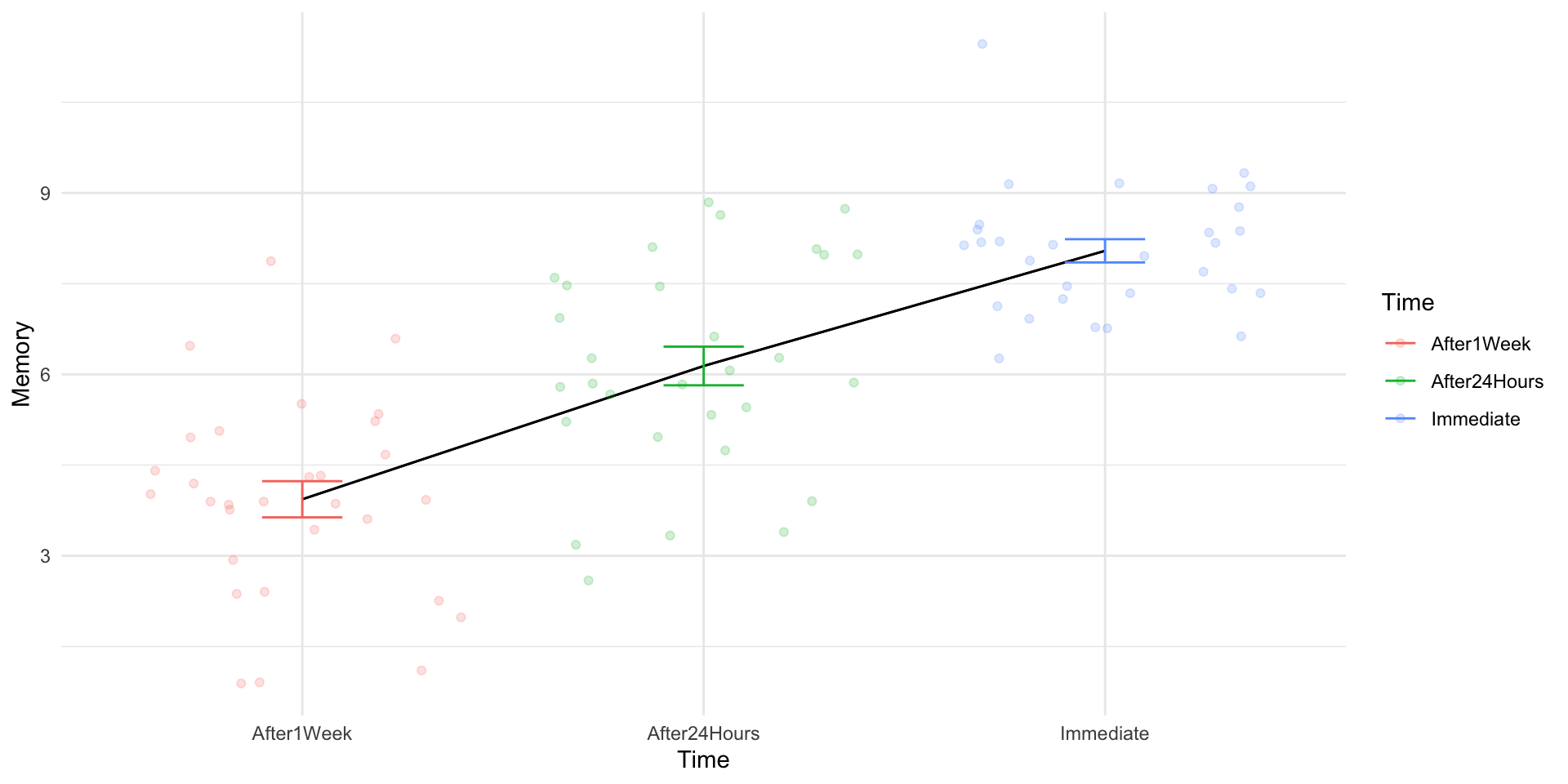
Memory Recall Study

Code
set.seed(100)

# Memory Recall Study
memory_data <- data.frame(
  Participant = factor(1:30),
  Immediate = rnorm(30, mean = 8, sd = 1.5),
  After24Hours = rnorm(30, mean = 6, sd = 1.5),
  After1Week = rnorm(30, mean = 4, sd = 1.5)
)

# Make Data Longer
memory_data_long <- 
  memory_data |> 
  pivot_longer(cols = !Participant,
                      names_to = "Time",
                      values_to = "Memory")


aov(Memory ~ Time + Error(Participant), data = memory_data_long) |> 
  tidy() |> 
  mutate(
    Source = term,
    SS = sumsq,
    MS = meansq,
    `F` = ifelse(is.na(statistic),"--",statistic |> round(3)),
    p = ifelse(p.value >.05,"<.05",p.value),
    p = ifelse(is.na(p),"--",p)
  ) |> 
  select(Source, df, SS, MS, `F`, p) |> 
  gt() |> 
  fmt_auto()
Source df SS MS F p
Residuals 29   60.124   2.073 -- --
Time  2  253.722 126.861 53.001 8.10477782732907e-14
Residuals 58  138.826   2.394 -- --
Code
memory_data_long |> 
  ggplot(aes(Time,Memory, color = Time)) + 
    stat_summary(
    geom = "line",
    group = 1,
    fun.data = "mean_se",
    color = "black"
  ) + 
    stat_summary(
    fun.data = "mean_se",
    geom = "line",
    group = 1,
    color = "black"
  ) + 
  geom_jitter(alpha = .2) + 
  stat_summary(
    geom = "errorbar",
    fun.data = "mean_se",
    width = .2
  ) + 
  theme_minimal()

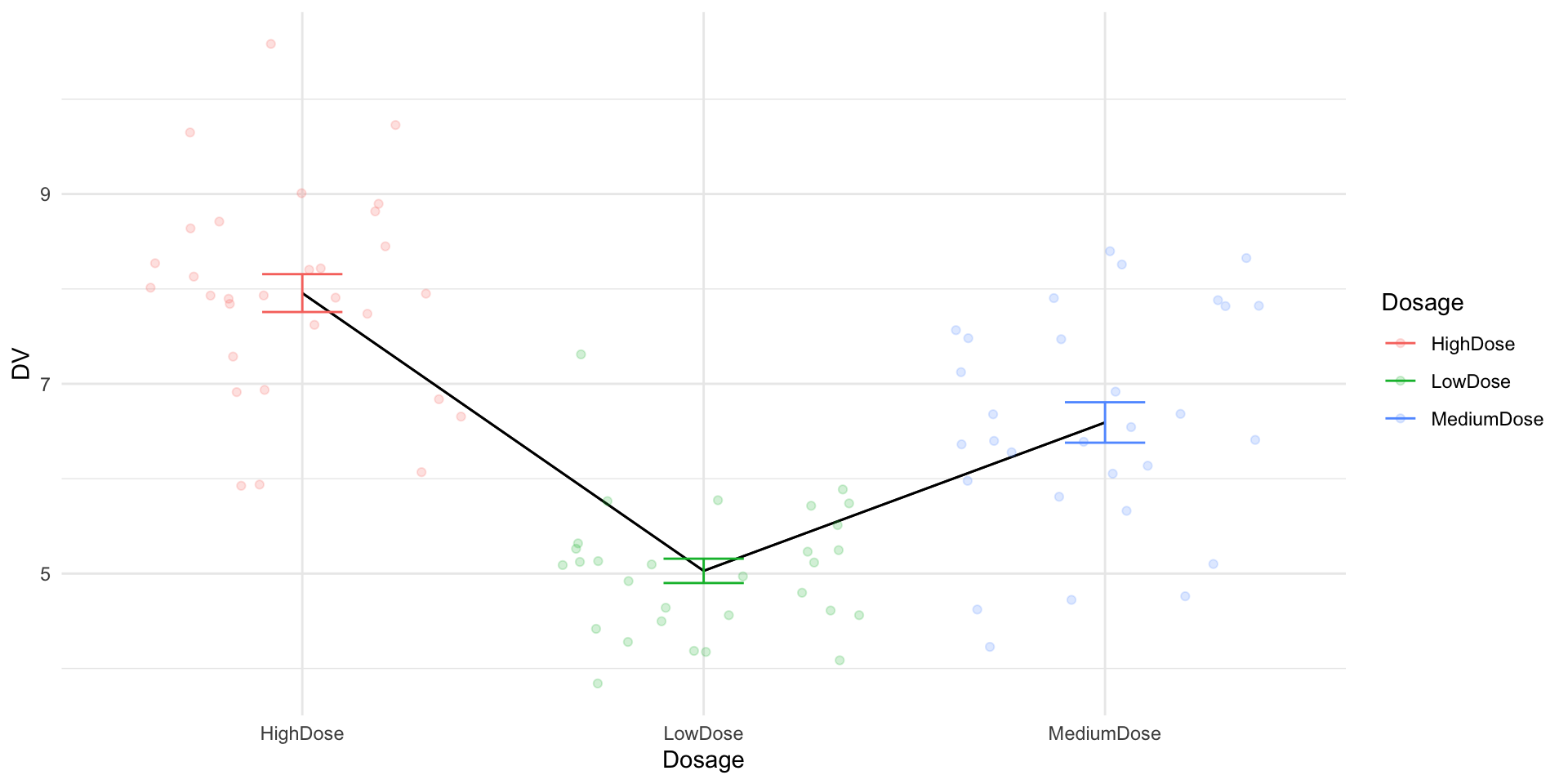
Clinical Trial

Code
set.seed(100)

# Clinical Trial Study
clinical_data <- data.frame(
  Participant = factor(1:30),
  LowDose = rnorm(30, mean = 5, sd = 1),
  MediumDose = rnorm(30, mean = 6.5, sd = 1),
  HighDose = rnorm(30, mean = 8, sd = 1)
)

clinical_data_long <- 
  clinical_data |> 
  pivot_longer(
    cols = !Participant,
    names_to = "Dosage",
    values_to = "DV"
  )

aov(DV ~ Dosage + Error(Participant), data = clinical_data_long) |> 
  tidy() |> 
  gt()
stratum term df sumsq meansq statistic p.value
Participant Residuals 29 26.72174 0.9214392 NA NA
Within Dosage 2 128.73321 64.3666071 60.50637 6.394066e-15
Within Residuals 58 61.70033 1.0637988 NA NA
Code
clinical_data_long |> 
  ggplot(aes(Dosage,DV, color = Dosage)) + 
    stat_summary(
    geom = "line",
    group = 1,
    fun.data = "mean_se",
    color = "black"
  ) + 
    stat_summary(
    fun.data = "mean_se",
    geom = "line",
    group = 1,
    color = "black"
  ) + 
  geom_jitter(alpha = .2) + 
  stat_summary(
    geom = "errorbar",
    fun.data = "mean_se",
    width = .2
  ) + 
  theme_minimal()

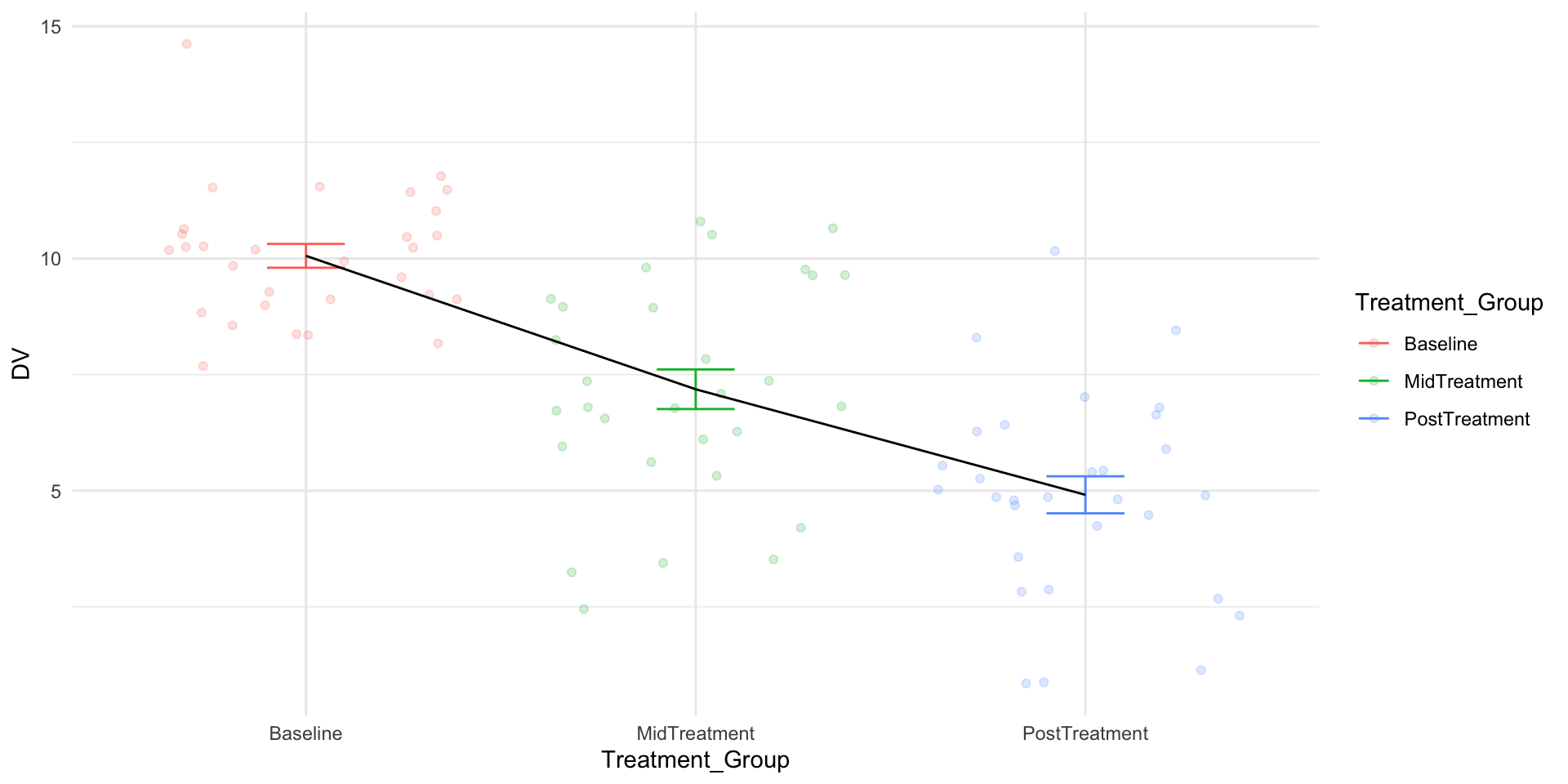
Behavioral Therapy Progress

Code
set.seed(100)

# Behavioral Therapy Study
therapy_data <- data.frame(
  Participant = factor(1:30),
  Baseline = rnorm(30, mean = 10, sd = 2),
  MidTreatment = rnorm(30, mean = 7, sd = 2),
  PostTreatment = rnorm(30, mean = 5, sd = 2)
)

therapy_data_long <- 
  therapy_data |> 
  pivot_longer(
    cols = !Participant,
    names_to = "Treatment_Group",
    values_to = "DV"
  )

aov_ez(
  "Participant",
  "DV",
  therapy_data_long, 
  within = "Treatment_Group",
  anova_table = list(correction = "none"),
  return = "nice"
) |> gt()
Effect df MSE F ges p.value
Treatment_Group 2, 58 4.26 46.88 *** .530 <.001
Code
therapy_data_long |> 
  ggplot(aes(Treatment_Group,DV,color = Treatment_Group)) +
  geom_jitter(alpha = .2) + 
  stat_summary(
    fun.data = "mean_se",
    geom = "errorbar",
    width = .2
  ) + 
  stat_summary(
    fun.data = "mean_se",
    geom = "line",
    group = 1,
    color = "black"
  ) + 
  theme_minimal()

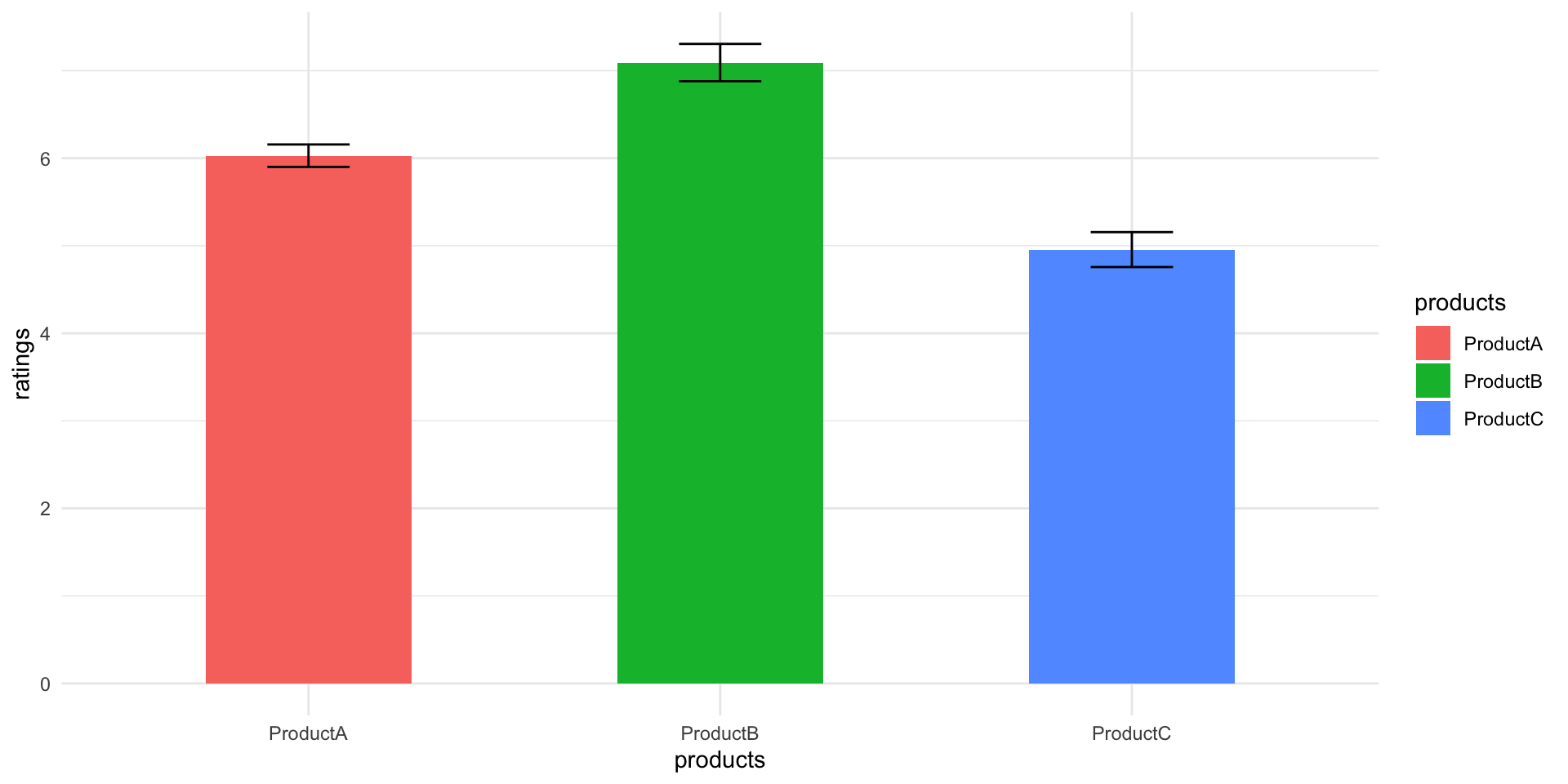
4. Consumer Product Ratings

Code
set.seed(100)

# Consumer Product Study
product_data <- data.frame(
  Participant = factor(1:30),
  ProductA = rnorm(30, mean = 6, sd = 1),
  ProductB = rnorm(30, mean = 7, sd = 1),
  ProductC = rnorm(30, mean = 5, sd = 1)
)

product_data_long <- 
  product_data |> 
  pivot_longer(cols = !Participant,
                      names_to = "products",
                      values_to = "ratings")

aov(ratings ~ products + Error(Participant), data = product_data_long) |>
  tidy() |> 
  gt()
stratum term df sumsq meansq statistic p.value
Participant Residuals 29 26.72174 0.9214392 NA NA
Within products 2 68.46662 34.2333084 32.18025 3.961105e-10
Within Residuals 58 61.70033 1.0637988 NA NA
Code
product_data_long |> 
  ggplot(aes(products,ratings,fill = products)) + 
  stat_summary(
    fun = "mean",
    geom = "bar",
    width = .5
  ) +
  stat_summary(
    fun.data = "mean_se",
    geom = "errorbar",
    width = .2
  ) + 
  theme_minimal()

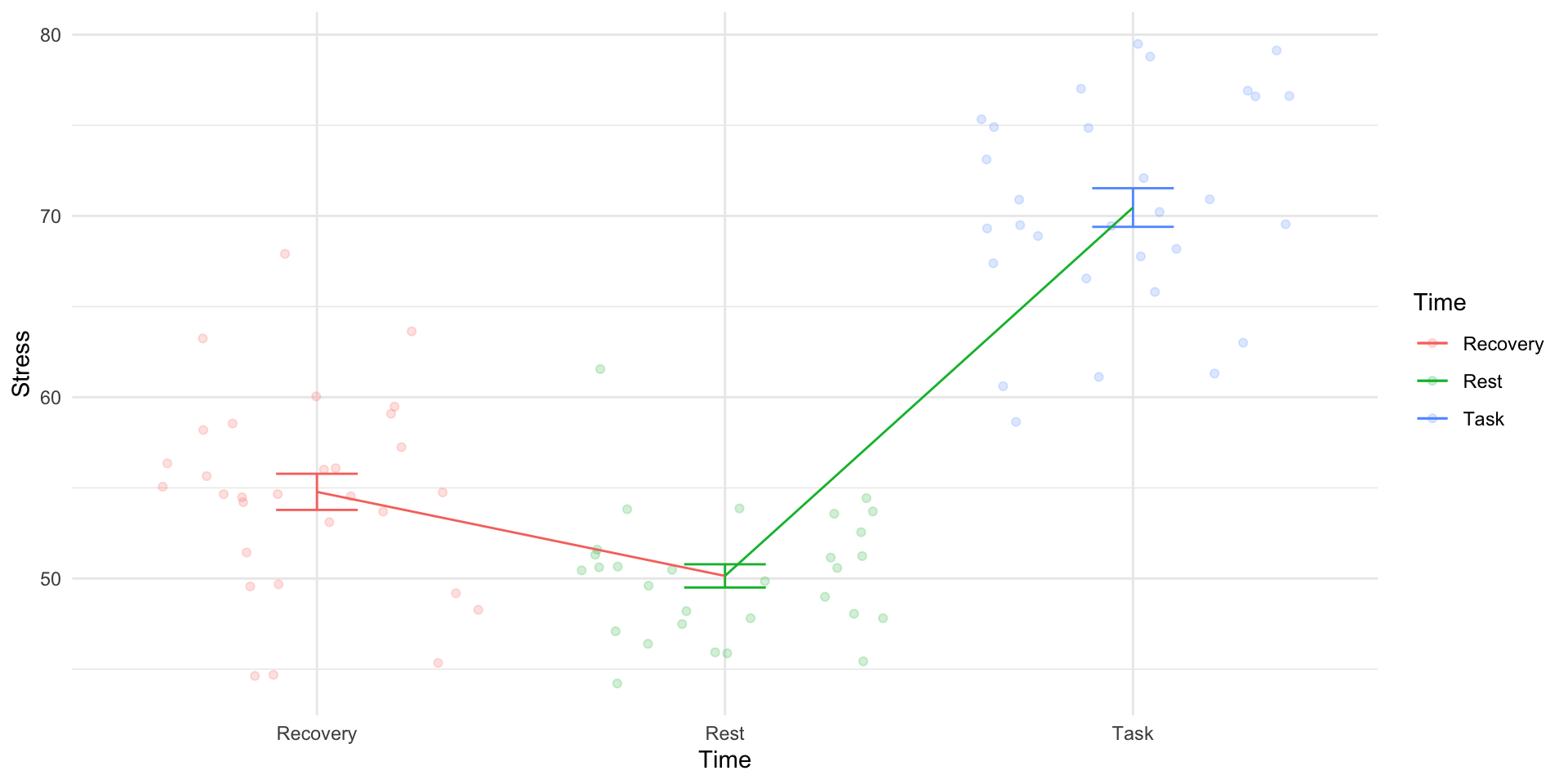
5. Physiological Stress Study

Code
set.seed(100)

# Physiological Stress Study
stress_data <- data.frame(
  Participant = factor(1:30),
  Rest = rnorm(30, mean = 50, sd = 5),
  Task = rnorm(30, mean = 70, sd = 5),
  Recovery = rnorm(30, mean = 55, sd = 5)
)

stress_data_long <- 
  stress_data |> 
  pivot_longer(cols = !Participant,
                      names_to = "Time",
                      values_to = "Stress")

aov(Stress ~ Time + Error(Participant), data = stress_data_long) |>
  tidy() |> 
  gt() |> 
  fmt_auto()
stratum term df sumsq meansq statistic p.value
Participant Residuals 29    668.043    23.036 NA NA
Within Time  2  6,802.717 3,401.358 127.895 5.456 × 10−22
Within Residuals 58  1,542.508    26.595 NA NA
Code
stress_data_long |> 
  ggplot(aes(Time,Stress,color = Time)) + 
  geom_jitter(alpha = .2) + 
  stat_summary(
    fun.data = "mean_se",
    geom = "errorbar",
    width = .2
  ) + 
  stat_summary(
    fun.data = "mean_se",
    geom = "line",
    group = 1) + 
  theme_minimal()